
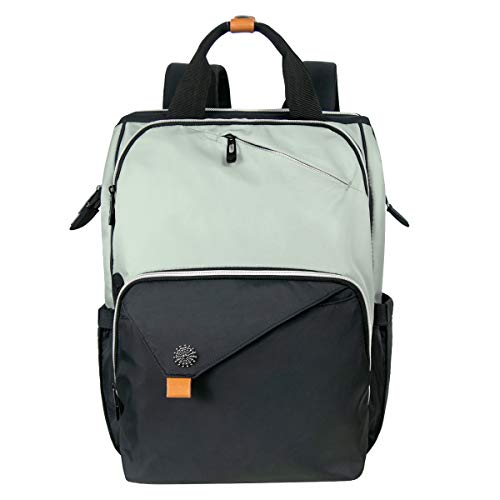


Hap Tim Laptop Backpack Product Overview
The Hap Tim Laptop Backpack is designed to meet the diverse needs of professionals and students alike. Whether you’re a teacher, nurse, or frequent traveler, this versatile backpack is perfect for carrying your laptop and essentials while on the go. With features aimed at providing comfort and functionality, it stands out as an ideal choice for anyone seeking a reliable and stylish backpack.
Table of Contents
Key Features
- Spacious Design: This backpack boasts ample room for your laptop, books, and daily essentials, making it perfect for work or school.
- Durable Material: Made from high-quality materials, the Hap Tim Laptop Backpack is built to withstand daily wear and tear, ensuring longevity.
- Comfortable Carrying: The ergonomic shoulder straps and padded back panel provide comfort, allowing you to carry your items without strain.
- Multiple Compartments: Stay organized with various pockets and compartments designed to keep your belongings easily accessible.
- Versatile Use: Ideal for different occasions, this backpack serves as a travel backpack, work backpack, and more.
Technical Specifications
- Model: Hap Tim Laptop Backpack (7651-GB)
- Type: Travel Backpack
- Designed for: Women, Workers, Nurses, Teachers
Benefits & Use Cases
This backpack is particularly useful for teachers needing to carry educational materials, nurses transporting medical supplies, or professionals taking their work on the road. Its spacious design and multiple pockets make it easy to pack everything you need for a day out or a weekend getaway, ensuring you always have what you need at hand.
Important Notes
While the Hap Tim Laptop Backpack is designed for durability, it is recommended to handle it with care to maintain its quality over time. This product comes as a complete guide, offering step-by-step instructions, templates, and eligibility checklists to assist you in making the most out of your new backpack.
For an organized workday, the Hap Tim Laptop Backpack can hold folders, books, notebooks, and chargers in the main compartment while smaller pockets keep pens, keys, identification, and cables easy to find.

How to Pack the Backpack Efficiently
Thoughtful packing helps distribute weight and keeps frequently used items within reach. Place the laptop in its padded section before adding heavier objects. Books, notebooks, and chargers can then be arranged in the main compartment, while smaller pockets can hold pens, keys, identification, and cables.
- Keep the heaviest items close to the back panel to reduce outward pull.
- Use a protective sleeve for devices if you carry other hard or sharp objects.
- Store liquids in a sealed pouch and keep them separate from electronics.
- Leave a little free space so zippers close without excessive pressure.
- Place travel documents and other essentials in a pocket that is easy to access.
Daily Travel and Commute Considerations
Before leaving home, check that the laptop compartment is fully closed and that all exterior zippers are secured. If the backpack will be used on public transport, avoid overfilling the outer pockets, since bulky items may catch on seats, doorways, or other passengers. A compact pouch for headphones, charging accessories, and personal items can make transfers between work, school, and home more efficient.
For longer walks, adjust both shoulder straps so the bag sits evenly rather than hanging low on one side. Carrying the backpack with both straps generally provides better balance than using a single shoulder strap. When placing it on the floor, set it upright where possible and avoid wet or dirty surfaces.
Before commuting, check the Hap Tim Laptop Backpack’s laptop compartment and exterior zippers, then adjust both shoulder straps so the bag sits evenly and remains comfortable during longer walks.
Choosing What to Carry
The appropriate load depends on the day’s activities. A teacher may need folders, lesson materials, and a tablet, while a nurse or mobile worker may prioritize compact equipment and personal supplies. A traveler may need room for a charger, water bottle, documents, and a change of clothing. Making a short packing list can prevent unnecessary items from adding weight.
- Workday: laptop, charger, notebook, pen case, and identification.
- Classroom use: computer, folders, stationery, and selected teaching materials.
- Short trip: device, power adapter, documents, toiletries, and a light layer.
- Commute: only the items needed for the destination and return journey.
Care and Maintenance
Routine care can help preserve the fabric, zippers, and interior lining. Empty every compartment regularly and shake out dust or loose debris. For minor marks, use a soft cloth lightly dampened with water and test it first on an inconspicuous area. Do not soak the backpack or use harsh cleaners unless the manufacturer specifically permits them.
Allow the bag to air-dry completely before storing it. Keep it away from prolonged heat, and avoid packing it while damp. Inspect the seams, strap attachments, and zipper tracks occasionally. If a zipper begins to resist movement, remove trapped material rather than forcing it, since excessive pressure can cause damage.
To help protect the Hap Tim Laptop Backpack and its contents, keep liquids in a sealed pouch away from electronics, avoid wet or dirty surfaces, and leave enough space for the zippers to close without pressure.
Limitations to Consider
A backpack’s capacity is finite, so carrying a large number of books, bulky accessories, or heavy equipment may make it uncomfortable even when everything fits. It is also important to confirm that your laptop’s dimensions are compatible with the dedicated compartment before purchase or regular use. Device protection can be reduced if the bag is overloaded or dropped, so valuable electronics should be handled carefully.
Organization features improve access but do not replace separate protection for fragile items. If your work requires specialized medical equipment, camera gear, or unusually large files, compare those requirements with the available compartment space before relying on the bag for the entire load.


